[Utopian Dev] Add the Wallet Page
Last week, @utopian-io called for React developers to work on the Utopian front-end.
Fortunately, I was able to pick a task within my capabilities as a developer - porting the Utopian wallet from busy.
New Features
- Utopian Wallet Page
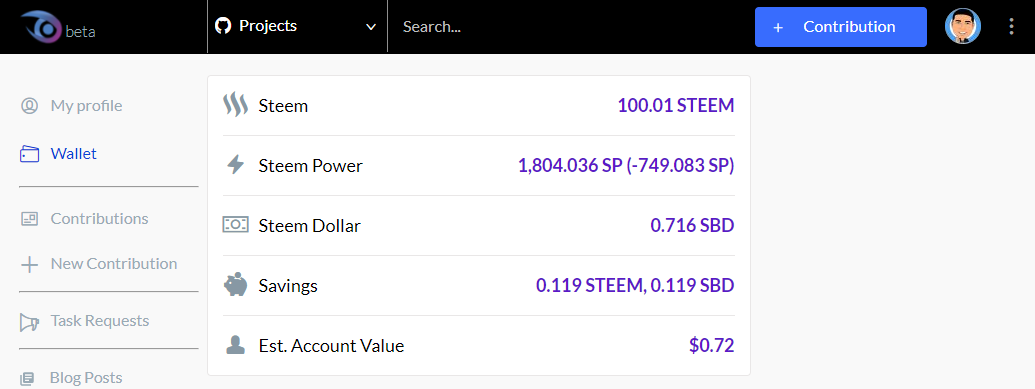
- How did you implement it?
There were 27 files changed in the PR. The main files would be the following:
1. src/routes.js

This added the /wallet route. When the user goes to https://utopian.io/wallet.
2. src/components/Navigation/Sidenav.js

This added the Wallet link on the left panel of a logged-in user.
3. src/user/UserWallet.js
4. src/wallet/UserWalletSummary.js
These were the main components that hold the info displayed in the wallet page.
| UserWallet | UserWalletSummary |
|---|---|
 |  |
| File Link | File Link |
5. src/helpers/steemitFormatter.js

This contains all the calculations needed for the info displayed in the wallet page, specifically Steem Power and Est. Account Value.
Scope of the Task
Port the wallet from busy.org to utopian.io.
Initial Assessment
This feature was not my first choice for the task to work on. Originally, I wanted to work on the FAQ accordion but @stoodkev already started to work on so I had to work on this second choice - adding the wallet page.
It was more challenging that I initially thought.
Initial Approach
Initially, I planned to just look through the PRs that contained the word wallet which led me to this PR. But as I was comparing the files from busy's master and utopian's master, I learned that the difference between the two masters and those included in the PR were drastically different. I had to resort to another approach.
Actual Approach
After learning the complexity of the first approach, I decided to conquer it from another angle - top to bottom.
Instead of checking each PR and copy the changes in each, I decided to add the wallet part by part -
from adding the route to /wallet, then the link to the left, etc. until all compile errors were resolved and the bare minimum wallet info was displayed.
The first step to this approach relied on brute copy paste. The end goal was to display the wallet page.
This was more complex than I imagined because of identifying which files to copy as well as discovering the change in the STEEM API used in busy and utopian. I had to make the decision whether to change all STEEM API calls from the existing or retain Utopian and just add the necessary API calls. I chose the latter for its minimal impact.
There were also compile errors I had to resolve. After a couple of hours of copy & paste hacking I was able to resolve all compile errors and display the wallet page albeit with some console errors, unnecessary changes, and not working wallet calculations. But this gave me an idea of the scope of the change.
Identifying Wallet Components
Once I was able to display the wallet and its components, I had to split it into components/units and add them individually to isolate problems. The components were:
- Left Side bar and User Profile Wallet link
- Center Wallet
A. Wallet Summary
B. Account transfer history - Right sidebar
A. Transfer function
B. Market
C. Rewards- Claim Rewards
- Current SBD and SP
This contribution is for #1 and #2.A.
PR
There were two PRs. One was directed to merge to master and the other PR to merge to develop. As discussed with Elear, new features should be merged to develop.
And this was the PR that was merged:
https://github.com/utopian-io/utopian.io/pull/272
Posted on Utopian.io - Rewarding Open Source Contributors
Thank you for the contribution. It has been approved.
You can contact us on Discord.
[utopian-moderator]
Thank you.
Hey @eastmael I am @utopian-io. I have just upvoted you!
Achievements
Community-Driven Witness!
I am the first and only Steem Community-Driven Witness. Participate on Discord. Lets GROW TOGETHER!
Up-vote this comment to grow my power and help Open Source contributions like this one. Want to chat? Join me on Discord https://discord.gg/Pc8HG9x
is great wallet .