You are viewing a single comment's thread from:
RE: French Polynesia – A State Of Mind
That's brilliant. Don't forget to pin your travel posts on http://steemitworldmap.com 😊
That's brilliant. Don't forget to pin your travel posts on http://steemitworldmap.com 😊
I haven't done that before, but I guess I should look into it.
I just checked into it, but French Polynesia is not even on there. LOL! There is nothing there but ocean. - Ignore that! I zoomed in and found it. :-)
I'm trying to understand what it's all about. It looks like I have to pin the photographs, not the actual post, to a location? This post actually covers a couple of locations with the images, so I'm trying to figure out how this works, so that each image shows up at the correct location.
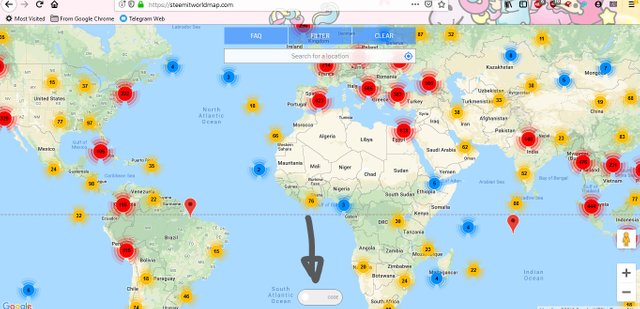
When you go into the map, there's a little button at the bottom called code. Click on that
Then in the search for a location box at the top, type in your location
You can zoom into the map and find a location that you went to. You can only select one, it doesn't matter which
Once you click on that location, you'll see a code pop up at the bottom, click on that to copy it, and then paste it on your post
A few moments later you should get an auto comment confirming your post has been pinned onto the map
That way you cann keep a collection of your travel posts, make it easier to share with people, and it maybe be curated by the @steemitworldmap.
Hope it works, if not, do let me know and I'll be more than happy to help you ^_^
Thanks so much for your detailed help. However, I am not seeing a button that says CODE. All I see are a peg man, and a plus and minus button.
This is what you should see when you land on the website. Those numbers are the posts already pinned onto the map. Once you click on that code at the bottom, the numbers will disappear and you'll get the search box at the top. Do you see something different on the landing page?
Thanks again! I have it now. I tried a different browser. It doesn't seem to work in Firefox which I mostly use.
Thanks for all your help. After copying and pasting the code into my blog, it is not showing up. I have to run out now, but will check back later to try to troubleshoot.
Three times now I have copied the code and pasted t into my blog, but it disappears when I Update the page. What could I be doing wrong?
You're on now Denise! You got the auto commnent. The code is quite clever, if you leave a blank line before and after it in the editor it doesnt appear in the post as some people said it looked a bit odd to have some random code on the post