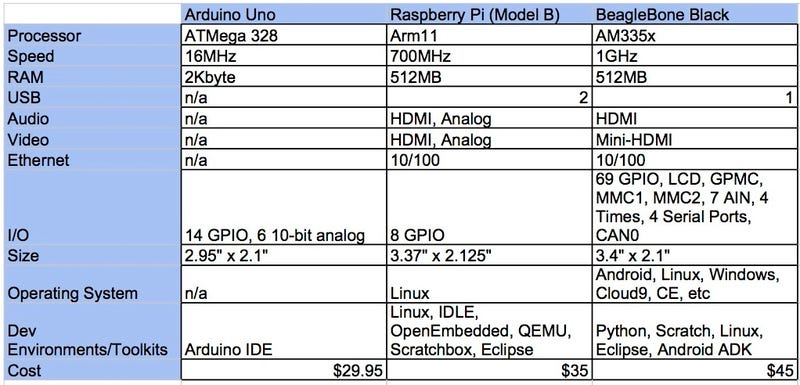
Image Source
What really sold me on the Beaglebone Black wasn't that it was slightly faster but the simple fact of storage. The Raspberry Pi has no on-board storage and the operating system is loaded and run on a Micro SD card. The Beaglebone Black had a Micro SD card slot and could be run the same way as well but also included was on-board physical storage to load the operating system to. There was just enough physical storage present to hold the operating system files. I am the type of person that likes to keep his storage files and operating system separate to reduce the risk of catastrophic failure and file loss. One other really cool thing the Black had was a power button, and didn't just power on when plugged in.
Sadly after purchasing the Black, I was never able to program the code in time to use the computer or sensors on the balloon flight. I was new to Linux based systems. Fast forward a few years and the Beaglebone ended up sitting after I gave up trying to get it back to a working desktop GUI. I had lost interest for that time and it got buried in a box. I ended up needing a spare bare bones computer to just surf the internet and streaming video, nothing heavy but I had no parts to build a tower.
I remembered the single board computer world so I checked the Pi out to see how far it had come along. I knew there was no point pulling out the Black because most web browsers now are memory heavy and I would lock it up with just a few tabs open. The Raspberry Pi Foundation was already on their third generation and the specs were pretty impressive.
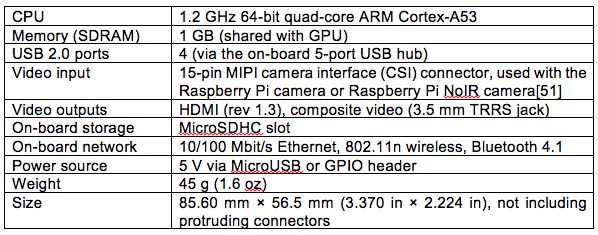
Image Source
Now although the speed of the board had not increased drastically, It offered the 64 bit processor. The RAM had doubled to 1 GB but that was shared with the GPU. The big selling point though was the WiFi chip that was included. This allowed the board to be networked without having to purchase a separate USB WiFi dongle, nor needing an Ethernet cable to set it up. The Pi Foundation also kept the composite video output and didnt just offer HDMI. All those new features included in the third edition and the board had not increased in price over the years. As with the Black, I purchased one immediately when saw they were in stock. The third edition seemed to be a hot commodity and was hit and miss with supply.
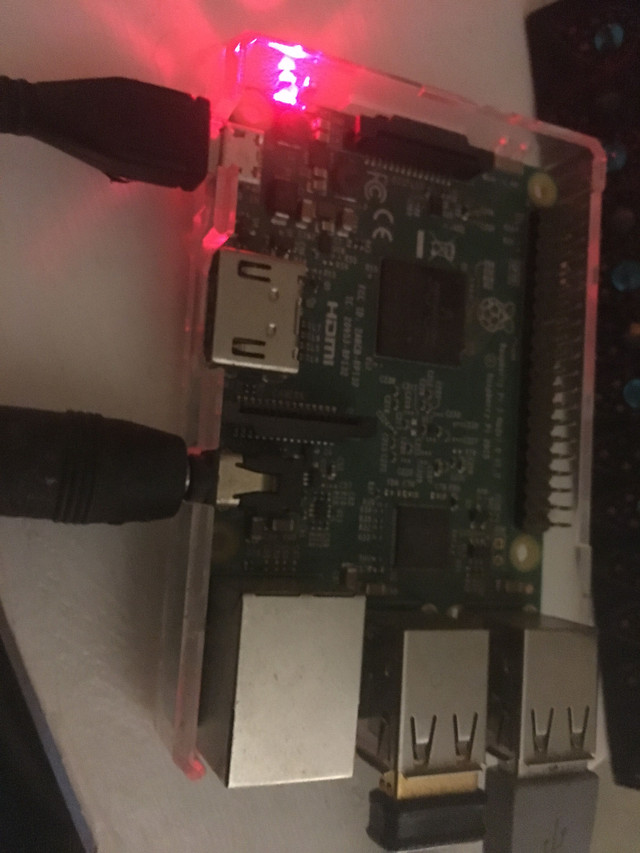
I was impressed by the video output and the PIXEL operating system. The WiFi had decent range and it functioned exactly how I wanted it too.
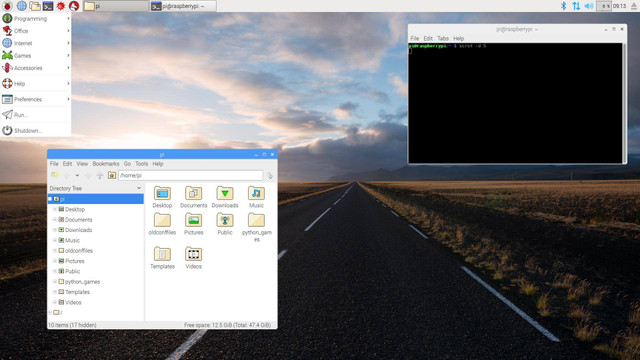
The area I wanted it in did not have internet access nor a television with HDMI support so all we did was watch DVD's. Once the Pi was introduced we could now stream video without having a giant unsightly tower; life was a lot better.
 I was so impressed by the performance of the Pi that I figured I would delve a little deeper into the single board world and check if there were any others that performed just as well. I had specifics that I was looking for and there was another company that caught my eye. Hardkernel produced a line of single board computers, one of which I found to have exactly what I was looking for; the Odroid C2. It included a 64 bit processor like the Pi but had support for 4K video! How can such a small computer have enough to power 4k Ultra HD video? I had to know so I purchased one.
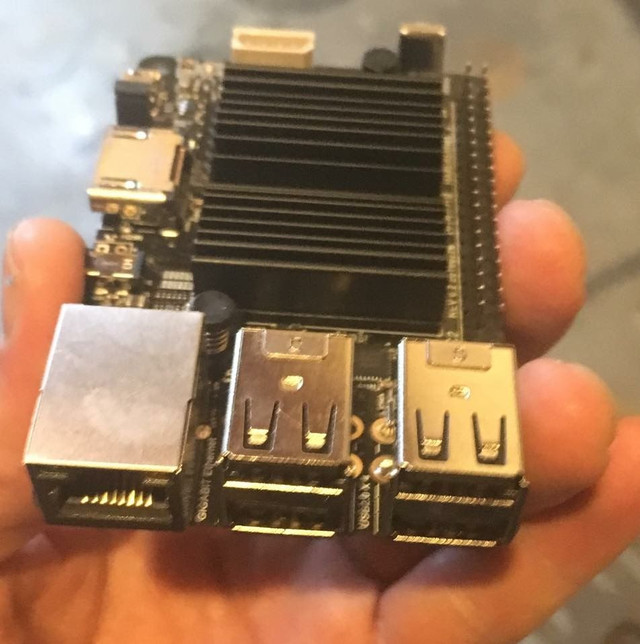
The Odroid C2 had almost the same form factor as the Raspberry Pi with everything in almost the same spot. Both fit in each others cases. The Odroid did not include a composite video out and only had the HDMI hookup. The Odroid instead included an IR sensor that one could program a remote to function with. Like the Beaglebone, the Odroid offered physical storage known as eMMC, but it was not included physically on the board. Instead, you needed to purchase it separately at a premium price. This almost doubled the cost of the Odroid but as it was dubbed as faster than running the OS off a micro SD, I purchased a 16 gig chip.
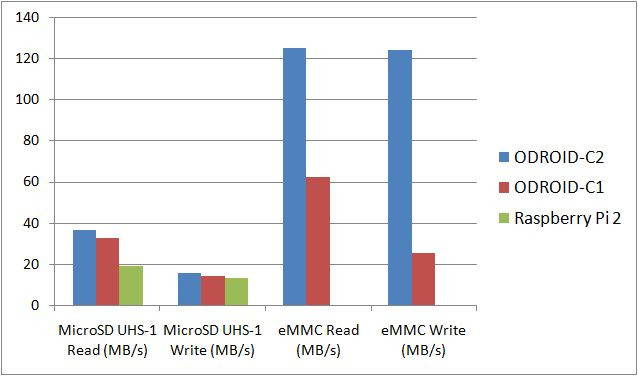
eMMC speed vs Micro SD
The Odroid didn't come with a WiFi chip like the Pi, but the Ethernet included was a Gigabit connection and roughly 10 times faster than the Ethernet connection on the Pi.
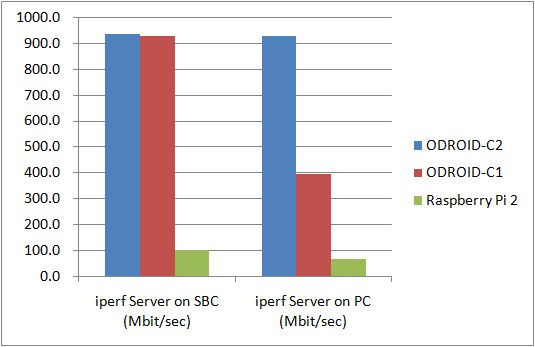
Odroid Ethernet connection speed vs the Pi
The Odroid C2 included several operating systems to install but the most appealing and lightweight was Armbian. Its ease of use was just like the Pi and it had way more options and programs installed.
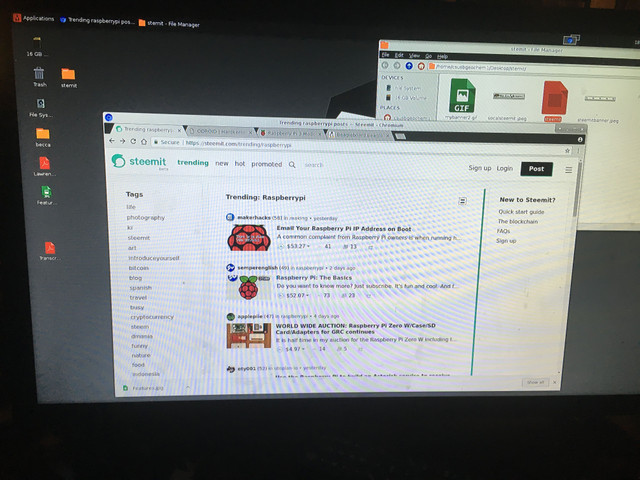
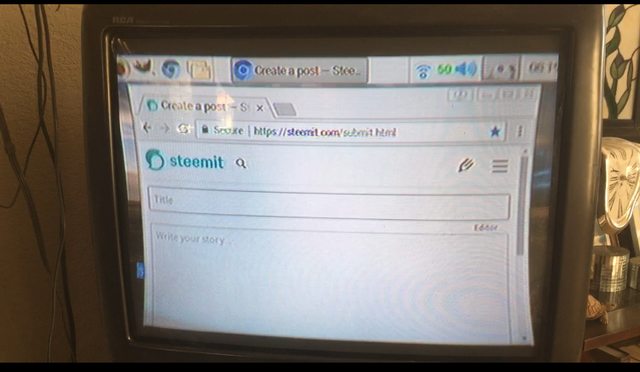
After using the Odroid I was hooked! It booted in 3 seconds, literally. The video quality was slightly better than the Pi and the speed of the Odroid was incredible. It could handle a load that would freeze up the Pi. I decided to instead use this single board computer as my Steemit blogging machine. As I sit here typing, I am doing so on my Odroid C2.
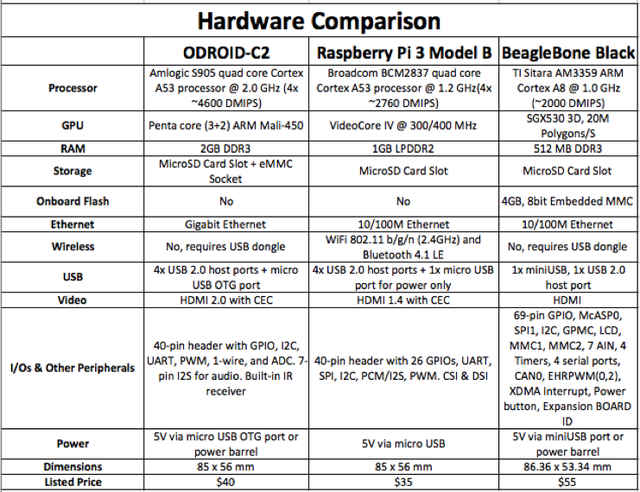
Comparisson of all three boards I purchased over time
Since purchasing the Odriod and Pi I have been hooked on single board computers. The power punch packed into these little machines is nothing short of spectacular. The interesting thing is, Companies far and wide are tying to get a piece of what the Pi has (no pun intended). Here is a small list of companies you may recognize, who have jumped on the single board bandwagon:
The Intel Galileo 2
The Asus Tinkerboard
The Nvidia Jetson TK1
The Pine64 single board computer
The Orange Pi
The Banana Pi
With all these companies producing single board computers the market is very competitive. I have recently wanted to purchase another SBC and figured I would wait until the Raspberry Pi 4 came out. Usually one came out every two years and it was almost that time for another edition to come down the pipeline, until I read the bad news. The Raspberry Pi Foundation announced that they were pushing back the production of the Pi 4 another year. I was really disappointed by this news because the major selling point of the Pi is its low price. More bad new for the Pi foundation was the announcement by Hardkernel and Pine 64 that they would soon be releasing their new models of single board computers, essentially leaving the Raspberry Pi in the dust. I will most likely be purchasing the new Odroid N1 to test out.
I hope this was informative about the amazing world of single board computers and just how handy and powerful they can be. Thank you for taking the time to read this post!
 All photos, unless otherwise stated or sourced, were taken by @csusbgeochem1. Cover photo and animation created by @csusbgeochem1 using GIMP.
If you found this story interesting you can find more like it by following @socalsteemit and help us expand the Steemit community together
All photos, unless otherwise stated or sourced, were taken by @csusbgeochem1. Cover photo and animation created by @csusbgeochem1 using GIMP.
If you found this story interesting you can find more like it by following @socalsteemit and help us expand the Steemit community together
 Join the SoCal Steemit Discord group today and meet others around you