Web browser automation in python with selenium
Hello,
Today we are going to see step by step how to automate a web browser. This can be useful for a lot of various repetitive tasks like submitting forms, reading data, testing etc.
For instance you could use it to debug your website with a bot that clicks everywhere and does everything possible on the website, this way you can be sure that your website is fully functional and that your new update won't break things. or subscribing a lot of accounts on a website, generating throwaway mails.
The advantage compared to just sending raw requests to the website is that everything is interpreted (javascript and co) by the browser. So if the website you want to automate relies heavily on javascript to display a popup), you won't get that information if you do raw requests.
So, what is selenium ? Selenium is a library supported in many languages (we'll use python 3). That can interact with a "web driver". Which is basically a program that can control the web browser. And we interact with this program's api.
get it ? code -> web driver -> browser And we interact with this program's api.
get it ? code -> web driver -> browser
Installation
pip3 install selenium
(woah that was complicated)
And you need the drivers :
Note that the driver needs to be in the PATH. The path is a variable within your system that contains paths to various executables (you don't have to do this for the chrome driver though).
Adding a new file to the path is well covered on many websites : windows](http://www.walkernews.net/2010/10/08/how-to-add-windows-program-to-sys](http://www.walkernews.net/2010/10/08/how-to-add-windows-program-to-system-path/)
adding file to path on linux](https://askubuntu.com/questions/322772/how-do-i-add-an-executable-to-my-search-path)
Aaaand we are ready to go !
# First steps
FYI : I use chrome because it's generally faster and when automating faster is better (duh).
So we have our directory with the chrome driver :
from selenium import webdriver
driver = webdriver.Chrome("chromedriver.exe")
driver.get("https://steemit.com")
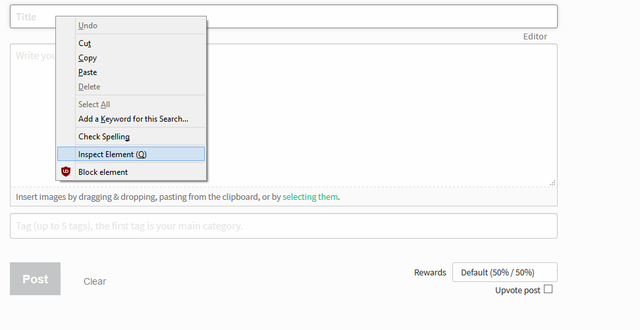
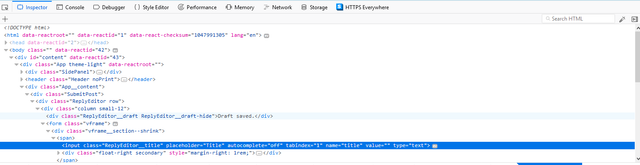

driver.find_element_by_name("body").send_keys("01010101010101010101010101110110101010101")
driver.find_element_by_name("category").send_keys("test")
Now we are ready to post !
driver.find_element_by_name("button").click()
Which gives us :
driver = webdriver.Chrome("chromedriver.exe")
driver.get("https://steemit.com/submit.html")
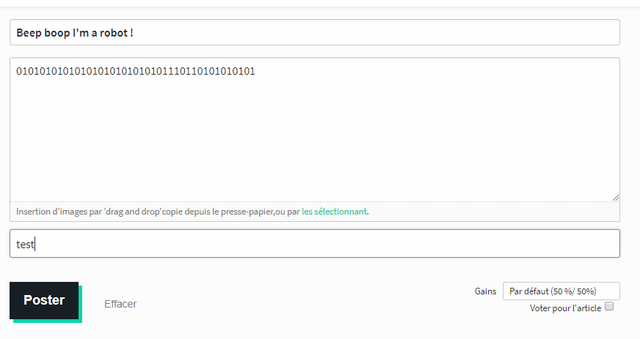
driver.find_element_by_name("title").send_keys("Beep boop I'm a robot !")
driver.find_element_by_name("body").send_keys("01010101010101010101010101110110101010101")
driver.find_element_by_name("category").send_keys("test")
driver.find_element_by_name("button").click()