How to Modify the Git Commit Messages After Your Push Your Branch?
Git is a popular and widely used version control system. If you stage your local changes and commit it to local branch, you can change the commit message by:
git commit --amend "new message"
If you simply type without the message parameter:
git commit --amend
Git will launch a text editor for you to change the commit message. You can edit and then save and exit (usually :wq for vim)
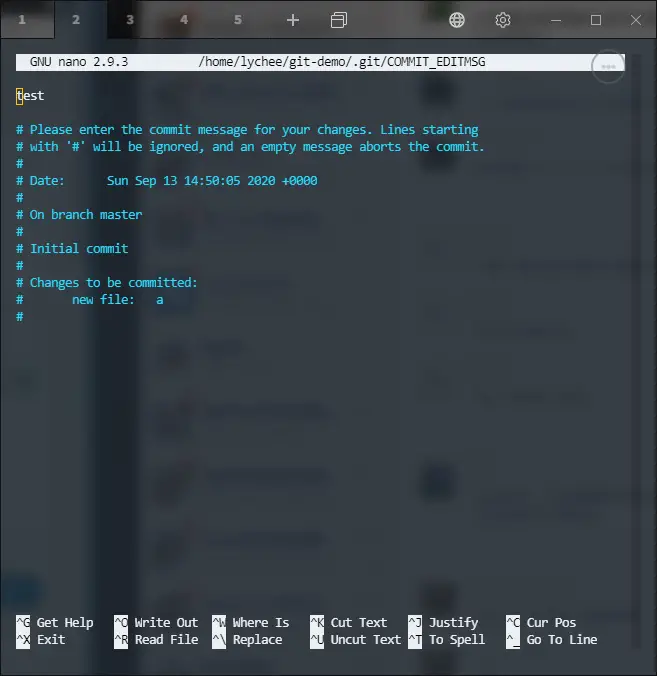
This command only allows you to amend the last commit - if you want to change multiple commit message you can git rebase
For example, you can change the last two commits:
git rebase -i HEAD~2
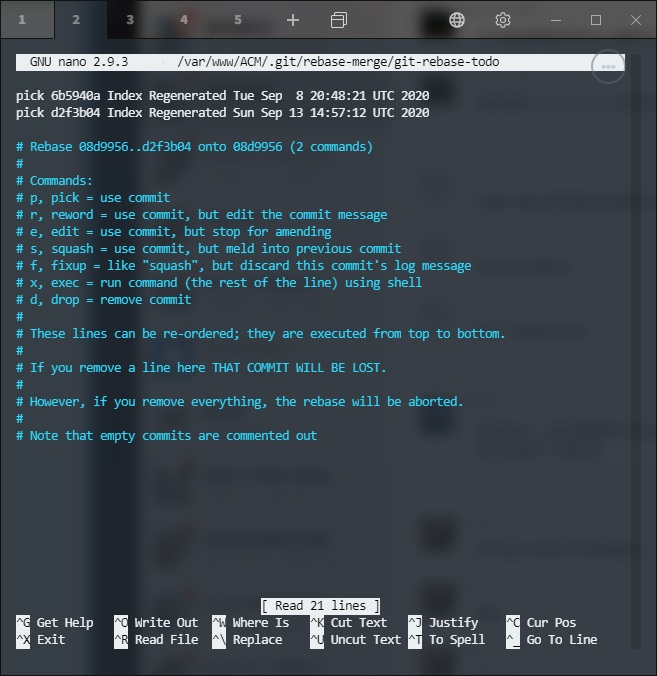
Then, you can reword, drop, or squash commit messages. You can also exec to run external command for example if you want to reword to a multiline commit message.
Once you have done changing the commit messages, you can git push -f to remote branch.
If you have a messy branch, it is recommended that you git checkout -b NewBranch then git merge MessyBranch, then you can squash your commit message by git commit -m "Squashed new commit message".
--EOF (The Ultimate Computing & Technology Blog) --
Reposted to Computing Technology
Follow me for topics of Algorithms, Blockchain and Cloud.
I am @justyy - a Steem Witness
https://steemyy.com
Steem On!~
Every little helps! I hope this helps!
- Computing & Technology
- Download Youtube Video
- Find Powerful and Bargin VPS on VPS Database
If you like my work, please consider voting for me or Buy Me a Coffee, thanks!
https://steemit.com/~witnesses type in justyy and click VOTE
Alternatively, you could proxy to me if you are too lazy to vote!
Also: you can vote me at the tool I made: https://steemyy.com/witness-voting/?witness=justyy
拍拍拍
感谢!
拍拍
感谢。
5拍
拍拍拍拍拍