[JAVA #13] [Web Automation #13] Selenium With TestNG #2 Asserting [CN]

image source: pixabay
对于自动化测试来说断言非常重要,比如贴子列表、标题、作者名、声望、内容是否正常显示等问题都需要一个个确认。
再一个就是这些断言的记录报告,没有完整的报告就很难找出出错的地方。
TestNG Assert 就是为处理这些而存在。
以下是我常用的断言方法,首先需倒入类 import org.testng.Assert.*;👇
    // 确认 object 是否为 null , 如发生 fail, 记录 message 到报告
    Assert.assertNotNull(object, message);
    // 确认条件的是否, 如发生 fail, 记录 message 到报告
    Assert.assertTrue(condition, message);
    // 与 Assert.assertTrue 相反
    Assert.assertFalse(condition, message);
    // 确认 actual 与 expected 是否一致 (包括类型), 如发生 fail, 记录 message 到报告
    Assert.assertEquals(actual, expected, message);
如果倒入为 static,则不需要写 Assert. 👇
import static org.testng.Assert.assertEquals;
import static org.testng.Assert.assertNotNull;
import static org.testng.Assert.assertTrue;

    ...
    ...

    assertNotNull(object, message);
    assertTrue(condition, message);
    assertFalse(condition, message);
    assertEquals(actual, expected, message);
👇 下列代码分别为 1)确认帖子列表是否显示 2)是否获取了密码元素 3)写文章按钮是否显示
(第3断言是我故意写错字,以便看错误报告)
package com.steem.webatuo;

import static org.testng.Assert.assertEquals;
import static org.testng.Assert.assertNotNull;
import static org.testng.Assert.assertTrue;

import java.util.List;
import java.util.concurrent.TimeUnit;

import org.openqa.selenium.By;
import org.openqa.selenium.Keys;
import org.openqa.selenium.WebDriver;
import org.openqa.selenium.WebElement;
import org.openqa.selenium.chrome.ChromeDriver;
import org.testng.annotations.AfterClass;
import org.testng.annotations.BeforeClass;
import org.testng.annotations.Test;

import io.github.bonigarcia.wdm.WebDriverManager;

public class Steemit {
 WebDriver driver;

 @BeforeClass
 public void SetUp() {
 WebDriverManager.chromedriver().setup();
 driver = new ChromeDriver();
 driver.get("STEEMIT URL");
 driver.manage().window().maximize();
 driver.manage().timeouts().implicitlyWait(3, TimeUnit.SECONDS);
 }

 @Test
 public void CASE_01_GetPosts() {
 List<WebElement> list = driver.findElements(By.xpath("//div[@id='posts_list']/ul/li"));
 assertTrue(!list.isEmpty(), "确认贴列表是否显示");
 for (WebElement post : list) {
 String title = post.findElement(By.xpath("descendant::h2/a")).getText();
 String author = post.findElement(By.xpath("descendant::span[@class='user__name']")).getText();
 System.out.println(author + "的文章: " + title);
 }
 }

 @Test
 public void CASE_02_Login() throws InterruptedException {
 // Click the login button
 driver.findElement(By.linkText("login")).click();
 // type id
 driver.findElement(By.name("username")).sendKeys("june0620");
 // type pw and submit
 WebElement pw = driver.findElement(By.name("password"));
 assertNotNull(pw, "确认密码原始是否显示");
 pw.sendKeys(Password.getPw());
 pw.submit();
 Thread.sleep(5000);
 }

 @Test
 public void CASE_03_Write() throws InterruptedException {
 // Click the write Button
 List<WebElement> writeBtns = driver.findElements(By.xpath("//a[@href='/submit.html']"));
 assertEquals(writeBtns.size(), 2, "写文章按钮是否显示");
 for (WebElement writeBtn : writeBtns) {
 if (writeBtn.isDisplayed()) {
 writeBtn.click();
 Thread.sleep(2000);
 // type Text and Keys
 WebElement editor = driver.findElement(By.xpath("//textarea[@name='body']"));
 String keys = Keys.chord(Keys.LEFT_SHIFT, Keys.ENTER);
 editor.sendKeys("hello!! world", keys, "hello!!! STEEMIT", Keys.ENTER, "안녕, 스팀잇", Keys.ENTER, "你好!似提姆");
 break;
 }
 }
 Thread.sleep(5000);
 }

 @AfterClass
 public void tearDownClass() {
 driver.quit();
 }
}
运行后第三个断言失败并且报告里正确显示我自己输入说明。
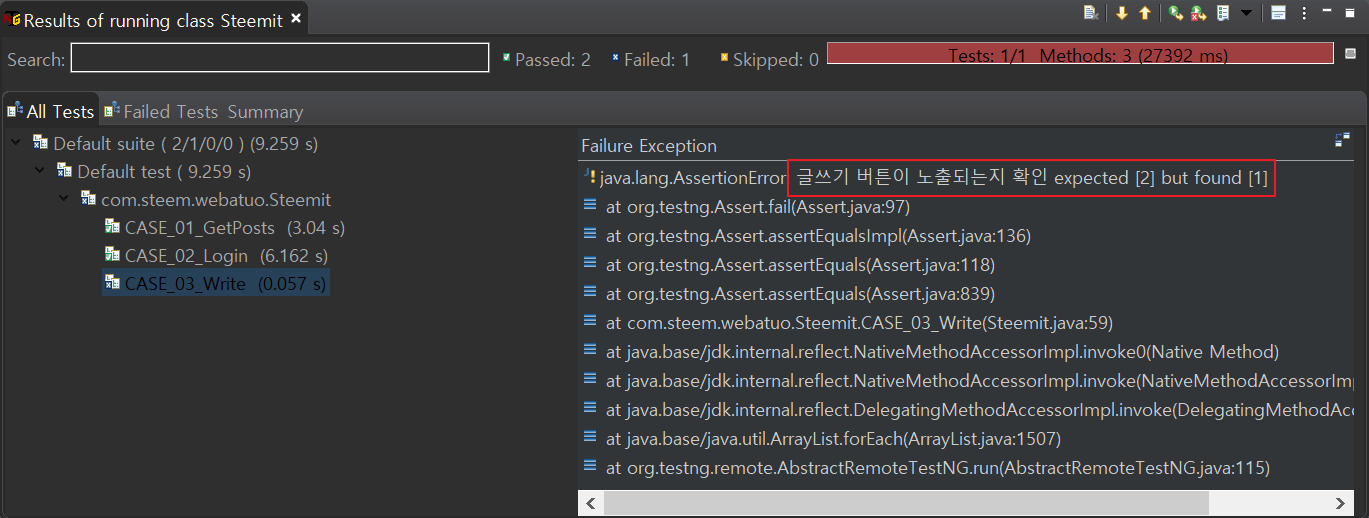
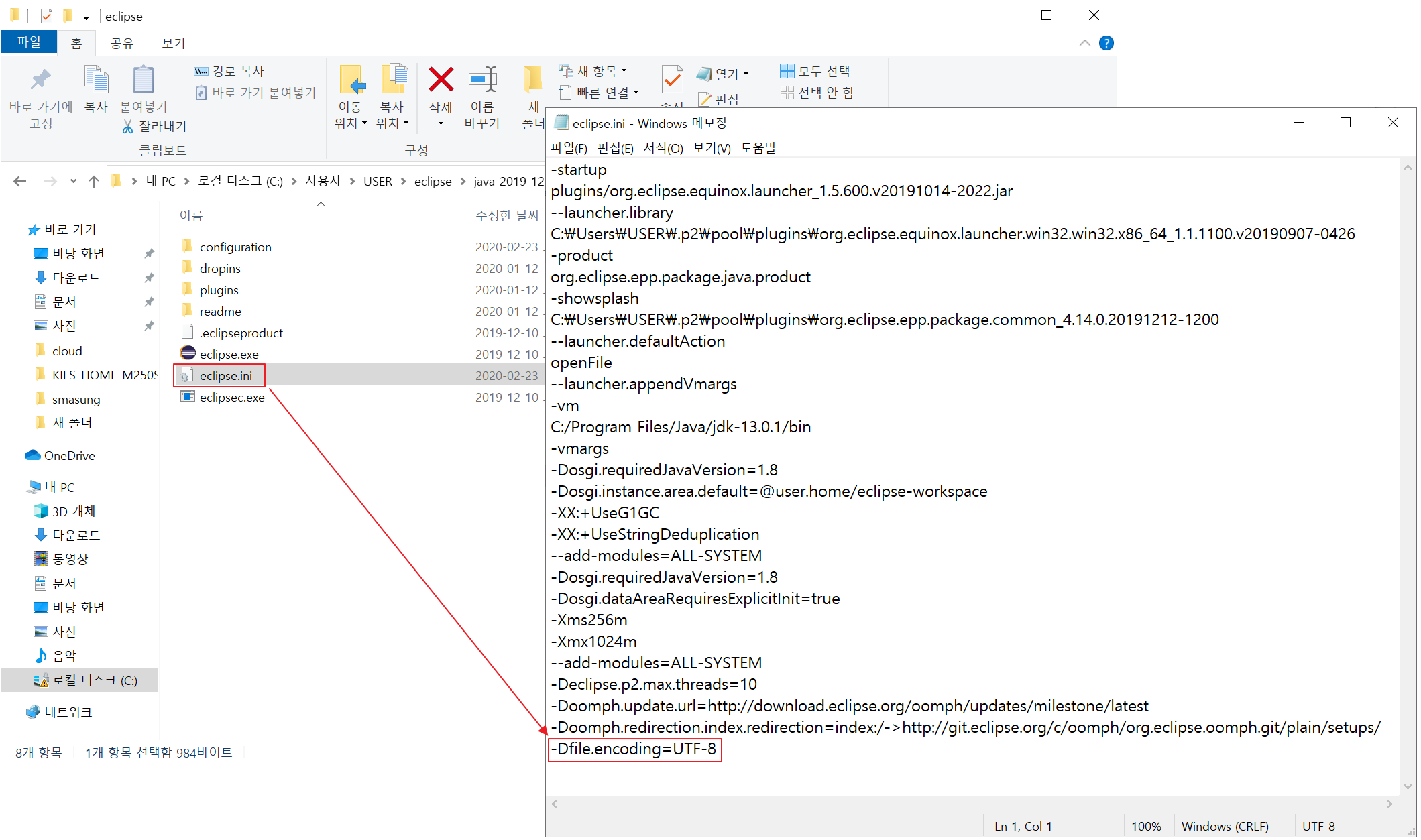
如果报告里的中文显示乱码,可以在eclips.ini 文件加上-Dfile.encoding=UTF-8,一般 eclipse 默认路径为 C:\Users\{用户名}\eclipse이다. 👇
👇 还支持下列高级函数,但我没用过,算了,以后慢慢用吧。
    assertEqualsDeep(actual, expected);
    assertEqualsNoOrder(actual, expected);
    assertNotEquals(actual, expected);
    assertNotEqualsDeep(actual, expected);
    assertSame(actual, expected);
    assertNotSame(actual, expected);
    assertNull(object, message);
    assertThrows(throwableClass, runnable);
.
.
.
.
[Cookie 😅]
Seleniun java lib version: 3.141.59
java version: 13.0.1
But the end of all things has drawn near. Therefore be sober-minded and be sober unto prayers.(1 Peter 4:7)
Question from the Bible, Does the Bible show any solutions on the current problems of mankind? [Part 1 of 2]
Watch the Video below to know the Answer...
(Sorry for sending this comment. We are not looking for our self profit, our intentions is to preach the words of God in any means possible.)
Comment what you understand of our Youtube Video to receive our full votes. We have 30,000 #SteemPower. It's our little way to Thank you, our beloved friend.
Check our Discord Chat
Join our Official Community: https://steemit.com/created/hive-182074
@tipu curate
你是不是做了自动定时发帖呀 我刚盯着看到时间刚过24小时诶😅
Posted using Partiko Android
晚上好 😄
不是自动发,我也守着呢!等34小时后发
34小时是神马时候啊
Posted using Partiko Android
韩国这里有34小时的 哈哈哈哈哈
Upvoted 👌 (Mana: 0/15 - need recharge?)
cn-steem steemstem要放前五位好像 属于普通类标签
Posted using Partiko Android
哎呀 我有忘了 多谢提醒 😄
写的太匆忙 哎。
现在还可以修改调整
Posted using Partiko Android
听你的 改了 😄
截个图给你看下
Posted using Partiko Android
还给我截图,你真好 😍🤩
@tipu curate 2
감사합니다 😀👍
你跟他说啥了 他是你女盆友吗 他迟来了🤭
Posted using Partiko Android
我跟他说 谢谢 😄,是位steem友😎
啪啪啪
谢谢 @sunai 👍
This post has been voted on by the SteemSTEM curation team and voting trail. It is elligible for support from @curie and @minnowbooster.
If you appreciate the work we are doing, then consider supporting our witness @stem.witness. Additional witness support to the curie witness would be appreciated as well.
For additional information please join us on the SteemSTEM discord and to get to know the rest of the community!
Please consider using the steemstem.io app and/or including @steemstem in the list of beneficiaries of this post. This could yield a stronger support from SteemSTEM.