The Swap process in the TronLink wallet.
Greetings to all readers of this great platform, in this opportunity I want to share with you the Swap process in the TronLink wallet, in addition to the process to add a token that we receive and is not shown in our wallet, it is a simple process but many do not know, that is why I decided to share with you the steps we must follow to achieve this exchange.
The first thing we must do is to open our wallet, in a previous post, I mentioned that the TronLink wallet, consumed energy and bandwidth to perform the corresponding operations, as you can see the energy of my wallet was completely consumed and the bandwidth I still have available, to perform the corresponding process we must press the option that says Swap, as shown in the following image.
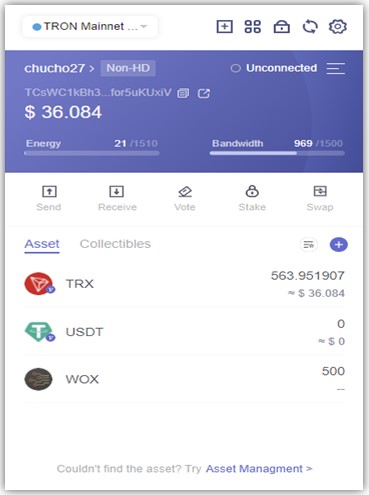 Screenshot taken from my TronLink Wallet |
|---|

When we press there, we will be sent to the official Sunswap page, where we must remember to select the V2 Network on the top right, then we select on the first line the token we want to transform, in this case the TRX, and on the bottom line the other token we want to acquire, from there we press the words Swap and confirm the transfer, as shown in the following image.
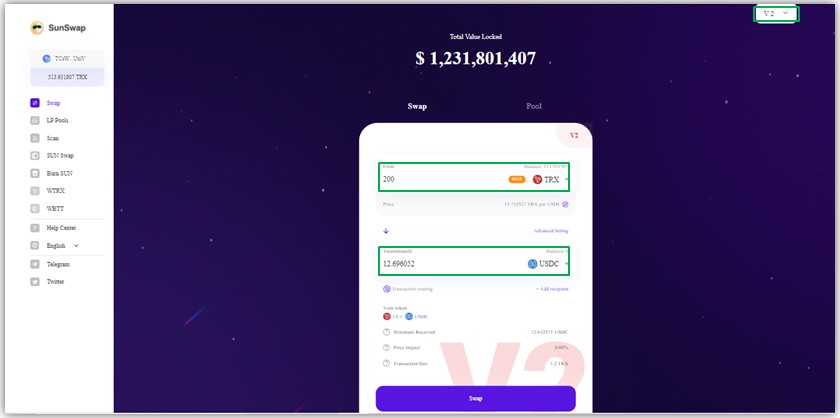 Screenshot taken at: Sunswap |
|---|
After completing this process, we return to our wallet and we will not see the token reflected, because it must be added to our TronLink wallet, for them we must click on the + symbol, which is located on the right hand side, as shown in the following image.
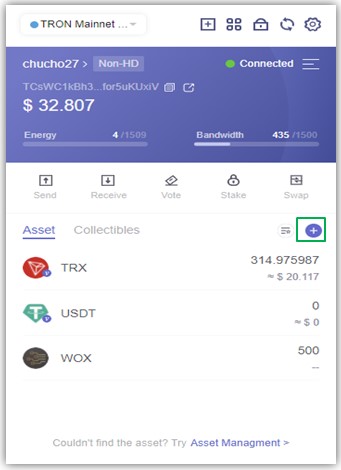 Screenshot taken from my TronLink Wallet |
|---|
When we enter there we will see that the USDC we acquired for this demonstration appear, and by pressing the + next to the token it will be reflected in our wallet as shown in the following images.
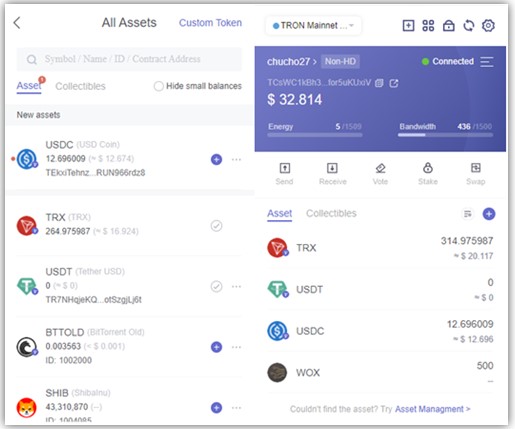 Screenshot taken from my TronLink Wallet |
|---|
The process is really simple, but many people do not know how to perform or how to appear reflected our token in the wallet, also as you can see in the previous image, to perform this transaction consumed a little more bandwidth with respect to the first image, in the same way it will recover gradually, thanks for reading my publication.

Hello @chucho27, Thank you for this good clarification, you are very right, some of us did not know this so that it is reflected in our wallet.
Hi friend @tocho2, glad to know that my post helped you to reflect your tokens in the wallet, thanks for letting me know.
Hi @chucho27
Thanks for socializing this intuitive and mul useful post about Sunswap, the platform allows to transform and exchange the tokens running on the DeFi associated to the TRON network. Good content.
Best regards, be well.
Hi friend @lupafilotaxia, thank you very much for your nice comment, I am glad to know that my publication is useful for people who want to use this wallet.
Una cuestión (probablemente haya alguna más)
¿los TRX NO deben estar en staking?
Si así es, cuando los retiro del "staking", se vuela toda la energía y la bandwidth.
Los retiro todos ¿será eso?
¿Qué hago mal?
@tipu curate
Thank you for your support to my work.
Upvoted 👌 (Mana: 1/5) Get profit votes with @tipU :)