Steempress: Bringing STEEM to the Wordpress ecosystem (REVIEW)
For a Casual blogger (and even professional ones....), WordPress is one of the most common Content Management Systems (CMS) out there. Easy to install and set up, and with a wealth of community developed plugins to enhance your web page or blog, its pretty much the first (and last) stop for most people interested in publishing content on the Internet.
So, we have @steempress, developed by @fredrikaa and @howo, which aims to leverage this massive Wordpress user base to bring more interest to STEEM. Put simply, it is a simple and easy to use plugin that cross posts to STEEM. So, from the point of view of a Wordpress blogger... you install the plugin and then you do absolutely nothing different to what you were doing before, the plugin automatically cross-posts to STEEM! Win, Win and Win!
As a "media" dApp (as defined by @stateofthedapps, State of the dApps, @steempress sits at a very healthy number 40 in dApp rankings across a number of blockchains (including EOS).

Installation
I've had a couple of WordPress websites for quite some time now... with the intention to use one for my own personal use, another for a music ensemble and then another one for just general blogging. However, the demands and routine of life means that I've got my own music ensemble website sort of passably set up and my personal one is not at all... that reminds me, for one music foundation, I'm supposed to keep an updated agenda... I think I am about a year behind on that!
Anyway, the blogging one had fell by the wayside... and then when I started blogging on STEEM, it was even more redundant! However, when I came across @steempress, I started to look into learning more about how the backend of WordPress worked. To slowly teach myself how to make a decent webpage. Well, at the moment, I understand mostly how the back end works... but I am a terrible web designer... with no eye for proportion or colour or anything visually aesthetic! So, I've given up a bit on my own blogging website (plus, I have STEEM direct!). However, I do still use the @steempress pluging for the @classical-radio curation account. I still need to learn how to tidy up the front end though... summer holiday project!
Anyway installation is stupidly simple. From the back end you find the button "Plugin -> "Add New", and click. Which takes you to a list of plugins from which you can search for SteemPress. Select the plugin, install and activate! All done in less than a minute or two.
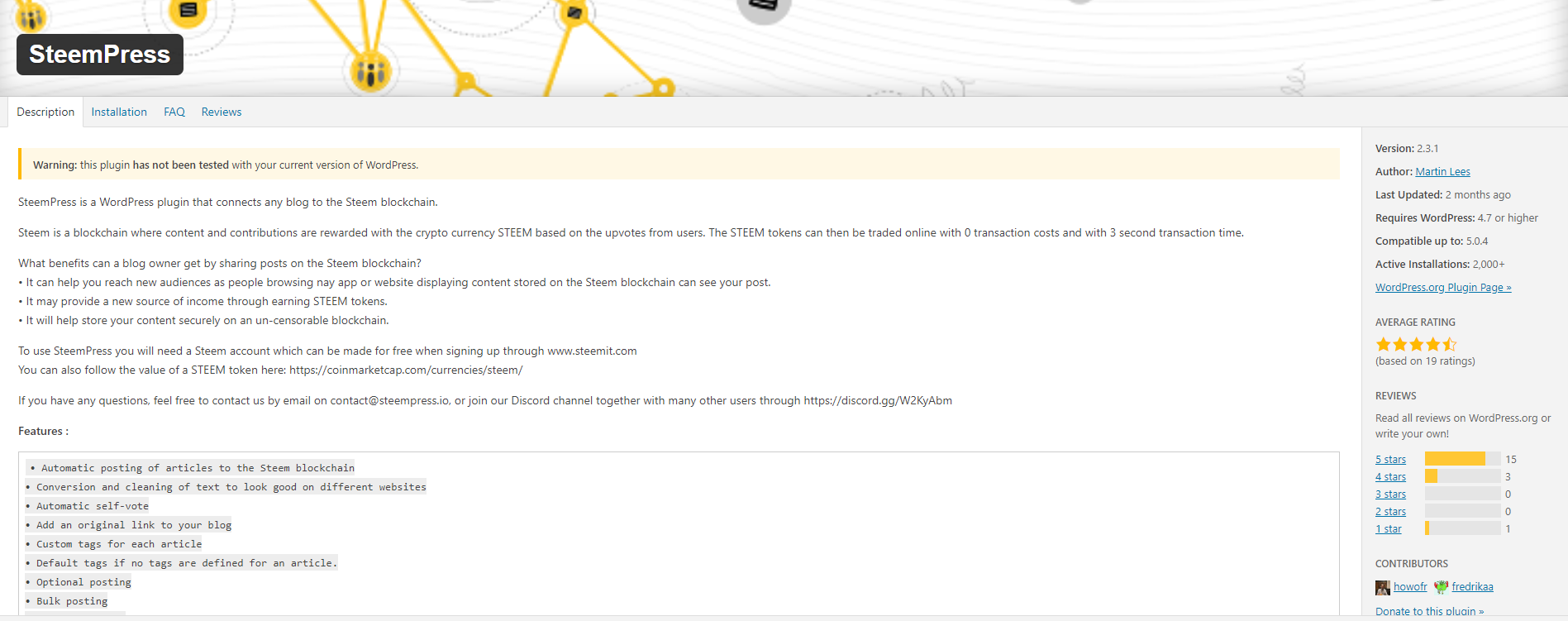
The reviews on the official plugin page are generally quite good, although there aren't that many.... but you can get a taste for some of the types of comments that you will get on STEEM! Ranging from the lengthy and informative... to "review".
Plugin Settings
All the action happens on the plugin page... which to be perfectly honest, you will see once when you set it up and then never again! That is actually a really good thing, as that means that everything is running smoothly and as intended... so, you actually DON'T want to see this page again!
At the top, there is Discord information, for support or community, and there is a Post Queue (I'm not sure, but after publishing on your blog, I think it gets sent to a post queue to post from the steempress.io front end).
There is a raft of default settings, which will be familiar to anyone who has used any STEEM blogging front-end. Username, Posting Key and Reward settings. The posting key requirement is the minimum required by the plugin, so its great that they didn't ask for a higher privileged key.
Default tags is pretty useful, I always put something in here as I often forget to add tags when I'm posting from Steempress. I try to set up all the metadata before I post nowadays, just so that I don't forget... but still, I often miss something!
Delay posts: To be perfectly honest, this option isn't for me... I'm not completely sure why it would be useful. Probably to have your own blog be the "main" source?
A handful of binary options finish up the default settings. Tag order, Self Vote, Footer text, Featured Images and update options. These are mostly options to affect how much of the formatting is carried over from the Wordpress site to the STEEM copy. The footer text is changable, I've left it as the default... just so that there is a little ad splash for the @steempress project. I'm not sure if I'll keep that for the @classical-radio account though.
There is a section for a BETA version of the Two Way Interface, so to have STEEM information (rewards, comments and upvote information) appearing on your personal blog. I've left it off, as I don't really feel any need to have that... however, the information could serve as an interesting way to lure people into the idea of STEEM!
Lastly, there is a word limiter for how many words will get published to the STEEM copy. For more professional bloggers, this would be a good way to have the STEEM copy as a "teaser" to their main site, where they might have more established monetisation methods.
My Thoughts
Honestly, the best thing that I can say about this plugin is that I've really forgotten that it is there most of the time! This is a plugin that you only notice at the backend, and when it is working... you just shouldn't know it is there! It works, and it does it's job well.... It is something that I recommend to the few people that I know that have WordPress sites!
Considering that I'm not really good at the front end stuff of the web page design (plus everything that I do on it is pretty basic...), I can't really speak about how faithfully it reproduces the original WordPress post on the STEEM copy. All of my posts end up looking better on the STEEM chain, but I think that is more due to the fact that I'm writing in markdown, which isn't so good on WordPress. However, I will start to learn the visual editor... I have to teach my wife how to use it!
One small improvement that I would suggest, is that there is some way for the abolute new beginner to STEEM to be able to purchase a STEEM account quickly. That there would be some sort of launchpad for a couple of purchase options, maybe Steem Ninja, or something like that? If I was a blogger that was just investigating the plugin, I think it would be a serious point of friction to not be able to set up a STEEM account quickly.
Always great to know new plugins work the way they should, thanks for the review @bengy, time long overdue to overhaul my neglected site.
Well... fuss free plugins are the best! They install and the just do what they are supposed to!
I always using Steempress for everyday. Helping grow up my Steem
But its not easy for someone who have no selfdomain wordpress
Posted using Partiko Android
I'm mixed about Steempress... the 15% beneficiary is set a little bit too high I think, I generally do most of my work from the SteemPeak interface. I prefer their model of dev team support,.
Steempress is awesome!
It's one of the dapps that can really bridge bloggers into Steem.
All we have to do now is to market them to Wordpress users by simply integrating Steempress into their blogs and let the Steem magic happen!
Posted using Partiko Android
Exactly... I wonder why it hasn't taken off! It is really a fuss free way to integrate...
Steempress is pretty cool, as long as their content code does not jerk on you, lol. Steemit's post display method causes some correct HTML code to be incorrectly displayed so sometimes the posts will look wrong. My suggestion is to always switch back to the HTML editor and paste the code in Steemit's editor after using the visual editor so that you can be sure that nothing is trying to pull your pants :)
Have fun with it and enjoy customizing your blog :D
Ah... that's a nice trick! Thanks for the idea!
Hi mate.
Great post.
Is this any good for the steem only blogger like myself? I usually spend ages trying to make the markup perfect and it drives me insane. Will it help with that sort of stuff?
Gaz
I'm not sure, but don't Steemit/Steempeak have Visual editors? I have to check that... anyway... no, it isn't worth doing Steempress if you don't already have a WordPress blog. It is more as a bridge for those who already have one!
Ah, ok. Thanks @bengy
To listen to the audio version of this article click on the play image.

Brought to you by @tts. If you find it useful please consider upvoting this reply.
This post has received a 3.13 % upvote from @drotto thanks to: @sbi-booster.
Congratulations! Your post has been selected as a daily Steemit truffle! It is listed on rank 9 of all contributions awarded today. You can find the TOP DAILY TRUFFLE PICKS HERE.
I upvoted your contribution because to my mind your post is at least 8 SBD worth and should receive 126 votes. It's now up to the lovely Steemit community to make this come true.
I am
TrufflePig, an Artificial Intelligence Bot that helps minnows and content curators using Machine Learning. If you are curious how I select content, you can find an explanation here!Have a nice day and sincerely yours,

TrufflePigHi @bengy!
Your post was upvoted by @steem-ua, new Steem dApp, using UserAuthority for algorithmic post curation!
Your UA account score is currently 4.465 which ranks you at #2145 across all Steem accounts.
Your rank has dropped 4 places in the last three days (old rank 2141).
In our last Algorithmic Curation Round, consisting of 220 contributions, your post is ranked at #75.
Evaluation of your UA score:
Feel free to join our @steem-ua Discord server