Computerproblems - playing videos
These past coupe of days, most videos I try to play on my laptop do not work properly.
I am usually on Google Chrome, and at first I thought it was the OS. But then I realized I cannot play my stored videos from my files either.
On Chrome Forum I found a similar complaint:
I need help. Google Chrome, since the last update, won't let me play videos
so I added my own 2 cents worth to the Forum:
I said:
For me, this just started recently (a few days ago) and it does not affect all videos, just some seemingly at random (some work, some don't). I went through my YouTube uploads, and its about half of them that do not play, just show a blurry zoomed-in image. I switched browsers, it does the same on Opera and IE (have not tried Edge, I hate it because it hangs up) - the only browser without any problems is Firefox!
Its not just YouTube, so the problem is not on their end, but the same happens on Vimeo and Facebook videos. Again, no problem on Firefox!
Strange also: I went to YouTube and filtered a search for most recent videos in the last hour, and randomly played some: the all played OK on Google Chrome.
My next test will be to re-upload one of my short videos that failed before, and see what it does now. Stay tuned.
I didn't even get that far: failed again - it does not matter with what I open any of my stored videos, they all screw up - so it is a Microsoft problem.
I have several video player apps, and the only one that works is VLC Video Player. It is the ONLY app where I can play my saved videos on my computer!
I don't know what the bottom line would be, but to watch videos Firefox is the only one that works for me, and the videos stored on my computer I can only watch on VLC Media Player.
Everything else screws up!
To summarize:
If I use Firefox, the on-line videos all work fine (YouTube, Vimeo, Facebook etc).
For my computer video files, only my VLC Media Player works, all other apps don't (not even Windows Movie Maker, which I had used for all my video editing so far).
Here is one of my YT videos that do not work for me on Chrome, but works fine on Firefox:
For me to look at this post in Chrome, the video is as described, garbled. I check this post in Firefox, and it works.
The worst part of this is that no matter what, I cannot play any of my videos from my computer files. Nor can I edit anything in Windows Movie Maker, since they load up garbled to begin with.
If someone has a solution, please let me know. Windows is updated, and so are the drivers. But if the drivers were at fault, then why can I play without problems with the VLC app and watch on Firefox?
UPDATE: I can play the same (and other ones of my videos from YT) on my Android Phone without any problems.
If you are on Windows and you use Chrome, and you can see this video without problems, please let me know.
I have a small, on its last legs notebook - takes very long to just sign in. Same: Windows, Chrome. No problem with video files, but that computer is awfully slow. Takes forever to load anything.
Also: I transferred a test video (that just does not work, like described, on my laptop) with Airdroid to my Android phone, plays on it without problem.
Hallo Otto,
ich habe jetzt das Video auf Chrome und Maxthron5 laufen lassen. Beide Versuche ohne Ruckeln oder andere Störungen.
Daher gehe ich eher davon aus, dass deine eigenen Videos dir deinen Arbeitsspeicher leer fressen.
An deiner Stelle würde ich zuerst versuchen mit dem CCleaner oder einem ähnlichen Programm das System zu entmüllen. Auch alte Wiederherstellungspunkte entfernen.
Auch sehr zu empfehlen ist der Avast Clean up.
Grüße
Wolfram
danke Wolfram, habe schon so einiges versucht.
Es sind Alle gespeicherten Videos auf meinem Computer betroffen, aber nur einige von meinen auf YouTube (hat weder mit dem Erstelldatum oder der Größe etwas zu tun), aber keine Anderen auf YouTube, so weit ich festellen konnte.
Wegen Arbeitsspeicher (oder auch Grafikkarte): da ist es aber verwunderlich dass dann auf Firefox meine YT videos einwandfrei laufen, und jedes Video auf meinem Computer mit meinem VLC player abspielbar ist, aber mit keiner anderen App (Windows Media Player und zwei weitere). Ein kurzes Video habe ich als Test auf mein Handy übertragen und auf Android spielt es auch ohne Problem.
Mein Verdacht dass es etwas mit Edge zu tun hat war auch falsch: spielt auch auf Edge nicht, so Firefox ist der einzige Browser der funktioniert.
System entmüllen: mach ich sowieso regelmäßig, ist eine der Funktionen auf Norton Security (Symantec)
Ich werde jetzt ganz einfach denen Beitrag resteeemen und das Problem den Experten vorlegen, die ich kenne.
Danke - ich kenne mich da nicht so aus. Wenn ich Google verstehe ich dann meistens nur Bahnhof.
mal probiert Grafiktreiber bzw. plugins neu zu installieren?
Klingt ein wenig nach Softwareproblemen / Konflikten.
dazu bin ich selber wahrscheinlich ein Bisserl überfordert. Muss halt jemand ranlassen der sich da besser auskennt.
Wegen Treiber geht mir nicht ein dass es auf Firefox funktioniert: alle Vimeo - dagegen schon gar nix auf Chrome (nicht meine, nicht Andere), und You Tube viele meiner eigenen videos nicht, aber einige funktionieren, und so ziemlich alle Anderen funktionieren auch, während auf Firefox funktioniert Alles, und interne videos mit VLC player geht, aber keine anderen Apps.
Deine Videos sind alle OK.
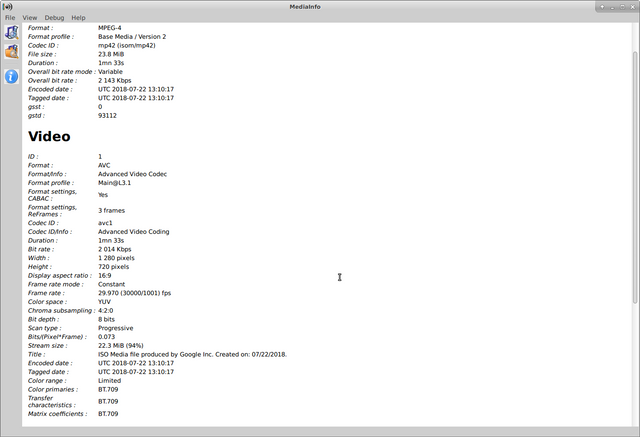
Ich habe sie mit sämtlichen Browsern und Mediaplayern auf Linux getestet.
Ich vermute dein Problem im Videocodec mp42.
Leider habe ich mit Windows keine Erfahrung, aber eventuell können folgende Links Hilfreich sein:
https://support.microsoft.com/de-de/help/15070/windows-media-player-codecs-frequently-asked-questions
https://www.moviecodec.com/download-codec-packs/microsoft-codecs-installation-package-6/
https://www.moviecodec.com/download-video-codecs/microsoft-mpeg-4-video-codec-fix-28/
Aber ich rate zur Vorsicht, lieber erstmal in ruhe alles überprüfen und dann erst installieren.
Viel Erfolg
Danke - so wie ich es mir gedacht habe: es funktioniert für jeden und überall, außer auf meiner Teufelsmaschine.
Ich werde mir erstmals den Help Link ansehen. Vorsicht: ja - ich trau mir sowas sowieso nicht zu, aber das kann auch behilflich sein wenn ich einen Experten ranlasse.
Unreal: without me doing anything at all, it is working again - today, August 5th.
I did have a crash yesterday because of overheating (I forgot to turn the cooling fan on), so I let it cool down and restarted, but only today I checked the videos. Everything is working as it should. Strange.......
Nevertheless, I will continue using the VLC media player and already waiting for the release of their video editing software.
And my trusted browser stand-by is Firefox, should this happen again.
Na das ist ja mal was.
Naja Computer sind auch nur Menschen ;)
Hallo Otto,
bin durch den Hinweis von @w74 hier gelandet.
Da muß ich aber die Flügel strecken, weil ich Chrome nur testweise mal benutzt habe, weil er angeblich so schnell sein soll. Bei mir war es das Gegenteil und ich habe ihn wieder entfernt.
Dein aktuelles Problem scheint ziemlich verzwickt, weil es nicht nur in einer Richtung (einem Browser, Player) auftaucht, sondern bei vielen und nur noch mit der FF Alternative funktioniert.
Macht mir schon wieder Angst vor dem nächsten FF Update. Kann auch etwas an meiner langamem Dschungelleitung liegen, aber nach jedem Update hab ich das Gefühl es ist ein "Downdate" und es geht wieder dies oder jenes nicht mehr oder muss neu eingestellt werden, what ever.
Daher bleibt mir nur die Möglichkeit des Resteems, damit vielleicht jemand anderes darüber stolpert. Vielleicht weiß @folker-wulff dazu etwas. Da weiß ich, dass er zumindest viel mit Videos und Videobearbeitung macht.
Gruß in die Alpen.
Herzlichsten Dank - ja, das mit den Updates hat es was - ist mir schon öfter passiert, vor langer Zeit sogar so mit einem Desktop, weder die Maus noch die Tastatur funktionierten (das war noch in Kanada, die sagten damals es war ein korruptes USB Protokoll). Hatte aber schon des öfteren auch Andere Updates Probleme und musste zurückrudern, doch dabei verliert man viel.
Nichts zu danken. War so die Mindestleistung, die ich beitragen konnte :)
In der Tat sind wohl viele Updates eine Verschlimmbesserung, die nur deswegen statt finden, weil sonst eventuell die hauseigenen Progger gelangweilt im Büro rumhocken.
Vermutlich sitzen die auch an an einem 400 MB Kabelzugang oder schneller. Für Teilnehmer mit langsamen Leitungen wird das alles immer nur noch aufgeblähter und bringt häufig mehr Ärger, wie Vorteile mit sich.
Wenn ich schon sehe, dass das "Feature" analoge Uhrzeitanzeige bei meiner Smartphoneschleuder, die mit NUR 2 GB Memory nach 3 Jahren jetzt unbrauchbar geworden ist, weil nicht mal mehr das Betriebssytem mit dem "wenigen Speicherplatz" klar kommt, satte 5,9 MB beansprucht, dann frage ich mich echt, was die Haubentaucher da machen.
Das sind 4 Disketten, auf die man früher jeweils ein Minigame drauf packen konnte. Graphisch natürlich nicht die Bombe, aber wieso eine analoge Uhrzeitanzeige auf dem Display 6 MB benötigt wissen nur die Götter. Vielleicht sind ja die Zeigerstriche in 4K Ultra-Auflösung und ich könnte die via Minibeamer an den Kölner Dom strahlen.
Zum Glück ist das digitale Ziffernblatt nur mit Strichen ausgestattet und es stehen keine Zahlen dabei. Sonst würde die Uhrzeitanzeige sicher 25 MB benötigen :D
haha, lustiges Kommentar das aber genau zutrifft! Die wollen natürlich dass Du Dir einen Computer mit 16 GB RAM oder besser beschaffst. Ebenso mit Smartphones, jedesmal mehr Geld reinstecken und Verträge bis Lebensende und danach verlängern......
W7 Chrome works
ja, denke schon, es funktioniert ja für jeden, nur nicht für mich!
Ich habe sogar probeweise ein kurzes Video mit Chrome auf You Tube hochgeladen welches auf meinem Computer nicht funktionierte (außer VLC player). In Chrome auf You Tube ist es wie beschrieben schlecht, aber auf Firefox funktioniert es einwandfrei (sowie auch Alle meine Anderen You Tube Videos).
Firefox und VLC player sind Open Source.
PS: W7, das ist aber schon ziemlich alt ......