Achievement-2।।Task: Basic Security on Steemit।। @suvo01 MENTOR @cryptokannon
Hello Every Steemians.
Assalamulikum
I am here again with my second post on my Achievement 2 task is all about the Basic Security on steem and the significant on how is key works in the steemit community. Specially thanks to @cryptokannon for expounding well on how to achieve this task.
Let's Start......
First you need to download a PDF file of Steam's password and save it well.
Every key is very important for a steemit user.Basically the Steemit blockchain Four keys are used. I first learned about these four keys and gotten the basic knowledge of how to use them.
The four keys:
Posting key
Active Key
Owner Key
Memo Key
Posting key:
The key I will talk about first is the posting key. This key is very important for every user because you need this key to log in to your Steemit account. You will need to enter your account with this key to upvote or downvote any comments and posted on your ID. If you lose this key, you will not be able to do any work from your id platform.
Active Key:
Now I will talk about Active key. Active key is very important for every user because with Active key you can transfer your Steemit Token. You need Active Key to transfer Steem Token from one ID to another ID. Also Steem Token Powerup or Powerdown conversion requires an active key. If you lose the active key, you will not be able to perform these tasks from your ID.
This is what power up is all about. Power up is the strength of your account. And this is what is needed to transfer tokens from one Steem account to another Steem account.
Owner Key:
Steemit ID The most important key is the Owner Key. The owner needs the Owner Key to change all the tasks. To do this, you need the Owner Key, to restore your account, to do all kinds of important work, to secure your account offline. You need a key to Owner Key.
Memo Key:
Memo key is not considered as a very important key,because there is not much work done with memo key in SteemitID.But it is wrong to think that this key is not very important. Memo Key can do is encrypt and decrypt private messages that are sent through the blockchain.If you have received a private message that you would like to decrypt,Send an encrypted message and View an encrypted message.
Qus 01
Ans.Yes i have.
Qus02:
Ans:Yes i know.
Then 3 qus ans:
First I downloaded a PDF file. Then I saved it in Google Drive and then saved it in a notebook so that it would not be lost.
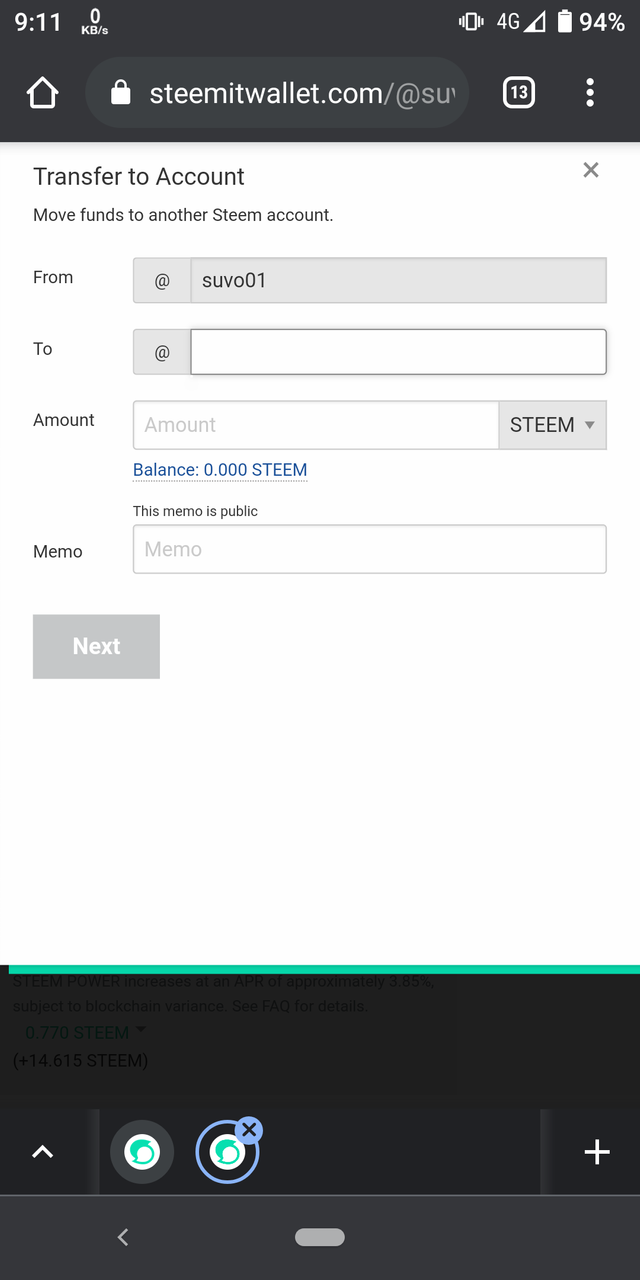
At First you have to login to Active Steem Wallet with Active K password. Then you will see a mark just below where you have the balance. If you touch there, you will get the option. In that option, your transfer is written. Then if you touch there you will see the option coming. Enter the ID of the person to whom you want to send your token and then enter the amount you want to send. If you put it and then next, it will go to his account, in this case, even if you don't give a memo.
In case of power up, you have to login to the wallet first. Then you will see an arrow below your amount. If you press there, you will get some options. In between you will get an option to power up. After the power off option comes, if you touch the task on the night you get it, you will see an option coming up.
Thanks everyone.
Cc:
@tarpan
@radjasalman
@besticofinder
@bright-obias
@adeljose
@tocho2
@whitestallion
@njaywan
Please answer all the question to get verified..
Qus 01
Ans.Yes i have.
Qus02:
Ans:Yes i know.
Then 3 qus ans:
First I downloaded a PDF file. Then I saved it in Google Drive and then saved it in a notebook so that it would not be lost.
At First you have to login to Active Steem Wallet with Active K password. Then you will see a mark just below where you have the balance. If you touch there, you will get the option. In that option, your transfer is written. Then if you touch there you will see the option coming. Enter the ID of the person to whom you want to send your token and then enter the amount you want to send. If you put it and then next, it will go to his account, in this case, even if you don't give a memo.
In case of power up, you have to login to the wallet first. Then you will see an arrow below your amount. If you press there, you will get some options. In between you will get an option to power up. After the power off option comes, if you touch the task on the night you get it, you will see an option coming up.
Add answer of this question also to complete your achievement task.
Hey @suvo01, This is Aniqa Mashkoor, a greeter helper.
congratulations! you have successfully completed your achievement 2. Now you can head towards completion of achievement 3. For this I'll recommend you to first read and understand this Achievement 3 : Content Etiquette guideline by cryptokannon
TASK RATE: 2
NOTE: Attach the link of your verified achievement 1 at the end of every achievement task.
I encourage you to complete your achievements till 4 to be a part of NEWCOMERS SUPPORT PROGRAM which is 500SP Minnow Support Program in the Newcomers' Community.
Happy steeming :)
Thanks