Objects and Object Models in JavaScript
Objects
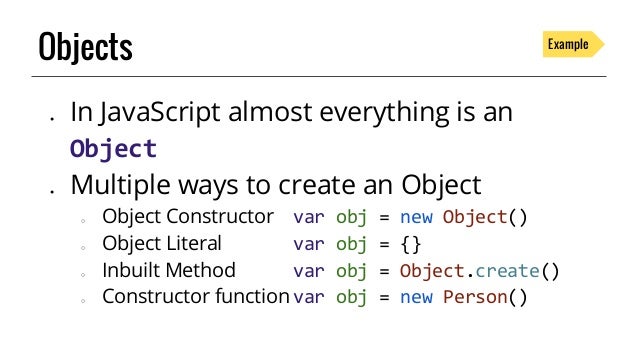
In object oriented programming an object is a representation of an entity, body, real time process or system in a simulated environment.
Objects create an instance of what they represent in the browser.
Properties, Methods and Events
Objects are made up of properties and methods and they all fill into individual roles.
Properties
For example, developing a car racing game would require the developer in charge to create an object representation of a car in his program.
To understand how he does that would require little examination of the components of an object.
Let's go back to our car racing game.
In real time, the process of building a car would require the addition of certain parts of a car that will perform specific functions upon instruction.
These parts of a car might include the wheels, gas tank, headlights and so on.
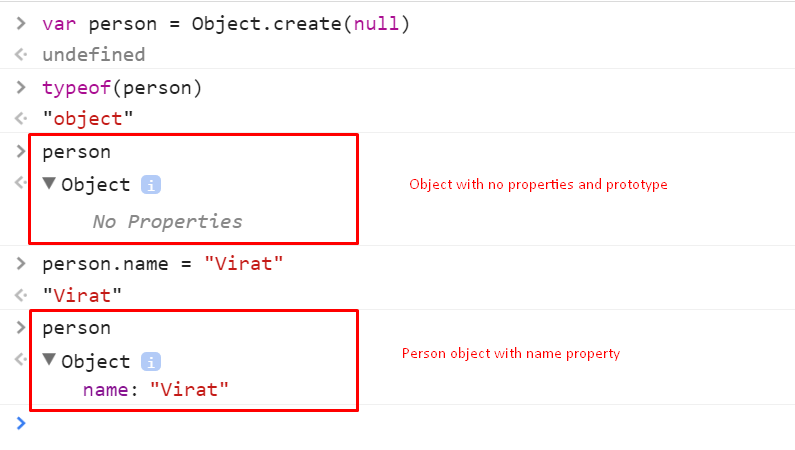
In the simulated world of objects these parts of a car are known as properties.
Methods
All the parts come together to perform a single function which is to provide a means of transport.
The only way they can do this is by playing individual roles on their parts. These individual roles are known as methods.
Methods are synonymous to functions in procedural programming, in fact they are one in the same.
Following is an illustration of how methods work
- Changing of gear in a mobile vehicle which would require the addition of a method that will be called once the driver/controller signifies for it to be called.
This method would contain variables that will hold data about the current gear position accessible to the program.
The program would then test the variable against some conditions, the outcome of this test would determine whether the gear position would be changed or not.
Events
Before the code in a method is run, the method has to be called for some way. The way to call for a method to be run is by the use of events.
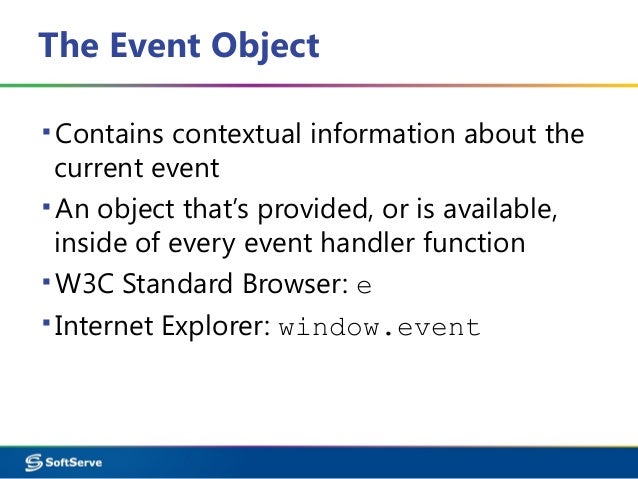
Events in OOP are synonymous to real life events, to buttress this point let's take a look at this example.
In our previous example about changing the gears in a moving vehicle. In real time setting, the reason for changing of gears in an automobile is linked to events like strains on the car engine.
In order to detect whether there's a strain on the engine in a simulated environment the developer of the car racing game would have to create what is called an event listener.
Event listeners do one simple job, they are constantly on the lookout for the occurrence of whatever event is specified and are responsible for linking events with methods to be executed in case of an event instance.
Events are set to be notified whenever a case of an event occurs, so in our car racing game an event listener will be created to look out in case of a strain on the engine, when it does detect a strain on the engine it then calls the method that will change the present gear to a new gear.
Web browsers and webpages are made up of collection of objects. The collective structure of this set of objects is known as the object model.
The smooth sailing of a browser-webpage relationship is largely dependent on the compatibility of the browser version and the objects rendered by the technology used to build the web page.
Object Models
JavaScript as a programming language deals with two types of object model
- Browser Object Model
- Document object Model
Browser Object Model
The Browser Object Model is a set of rules used to handle the objects provided for use by the browser in the development of web pages.

The objects provided by this model are restricted to the browsers control, this and the fact that there's no general rule concerning the regulation of browser object models has caused browser objects to vary across different browsers even though all browsers support certain universal browser objects.
Document Object Model
However, the Document Object Model is cross platform and and it's compatibility is spread across many browsers.
The word "document" itself refers to the webpage. This means that the control of the objects, methods and properties provided by the model are controlled strictly by the page.

Unlike the browser object model, the document object model is cross platform and the independent of any programming language .
The window Object
The job of the browser object model is to manage browser windows and the interactions between browser windows.
In JavaScript the document object is a child of the window object.
The former represents the JavaScript document object model while the latter represents browser object model.
Apart from the document object JavaScript features a few other child objects used for different purposes.
The following is a quick rundown of the JavaScript window object, with little note on its child objects, properties and methods.
The JavaScript window object is the top level object in JavaScript and is assumed as the default object when dealing with JavaScript programs unless another object is explicitly named.

Properties Of The Window Object
Some properties of the window object properties are objects in themselves, examples of this include
document: Used to control the dynamism of a webpagehistory: Contains records of all the pages visited by the userlocation: Contains information about the current webpage the user's onnavigator: Contains information about the browser and the operating system running the browserscreen: Contain information about the display capabilities of the present user machine.
Methods Of The window Object
The JavaScript window object comes with a number of inbuilt methods for different purposes. Some common examples include
open(): Which can take up to four parameters and used to instruct the browser to open a new window.setTimeout(): Can take two parameters, used to set the amount of time the program should spend executing a function in the browser window.Once the set time has been exhausted the program will experience a timeout error.
Event Handlers Of The window Object
The following event listeners are applicable to the JavaScript window object.
onerror: Runs whenever an error occurs.onfocus: Runs whenever the window is in focusonload: Runs whenever a page has loaded completely in the windowonresize: Runs whenever the window is resized
There are lots of methods, properties and events applicable to the window object, you can check out a comprehensive list of them here.
The document Object
All properties of the window object mentioned above are objects on their own and they all come with their various methods and properties.
Perhaps the most prominent of these objects is the document object.
The document object is the backbone of the document object model in JavaScript. It allows the program to be able to query and modify the HTML document.
Despite being a child object, the document object is also the next in hierarchy to the global window object in terms of functionality.
The document object is in control of various HTML elements and attributes embedded in a webpage, collectively these elements and attributes are known as nodes, some examples of these nodes include
Links: Refers to the content of the<a>tags in anHTMLdocument.Image: Refers to the contents of the<img/>tags in anHTMLdocumentForms: Refers to the contents of the<form>tag in anHTMLdocument.
The following methods are applicable to the document object and its nodes.
addEventListener(): will add a new event listener to the documentcreateAttribute(): will create a new html attribute node.createComment(): will create a comment node.
More on JavaScript document objects.
Thanks for sharing this bro, it really help us the beginners